
Note: This article was originally published on LinkedIn.
In my first two posts (part 1, part 2), I wrote about why I started building a Second Brain and how I designed the technical foundation behind it. That part matters, but infrastructure alone does not solve the real problem.
The real problem is the gap between having a thought and getting it into a system you trust.
Most good ideas do not show up when you are calmly sitting behind your keyboard with a clean desk and a cup of coffee. They show up in the car. During a walk. In the shower. When you are lying in bed just before sleep. Right when writing them down is inconvenient enough to make you trust your memory.
That is usually where the idea dies.
Omnichannel Is Not About Noise
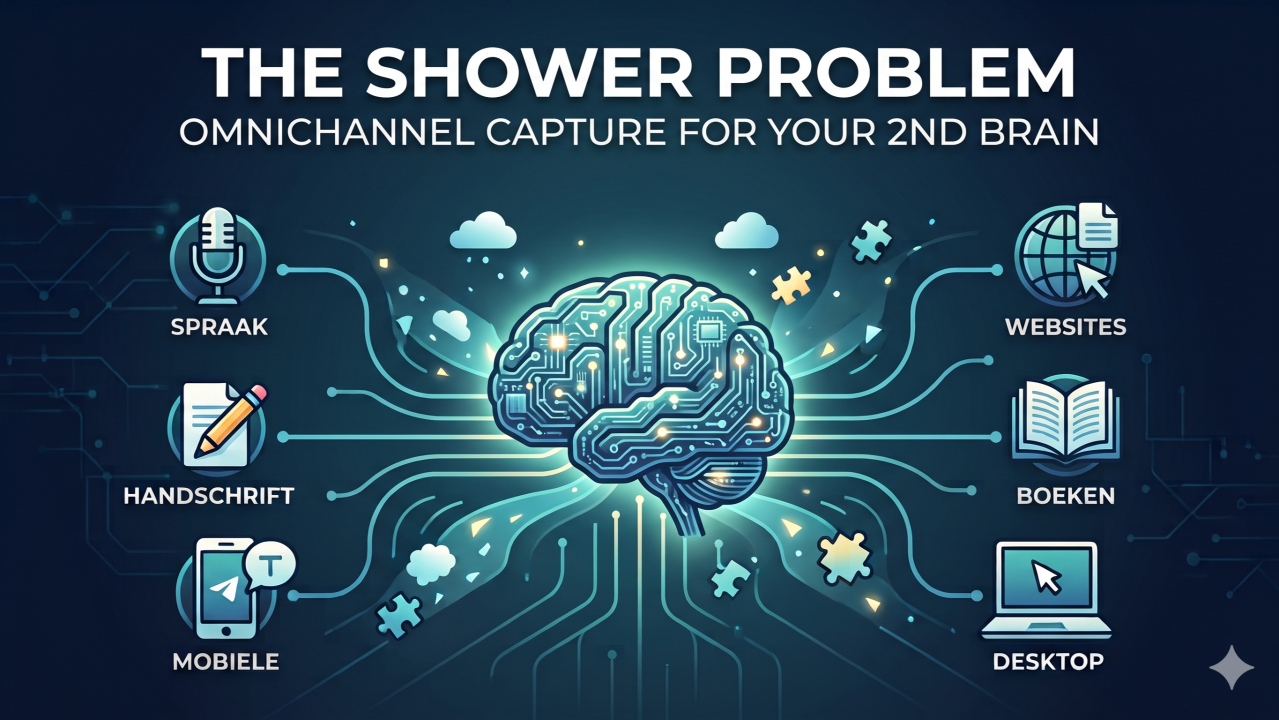
Omnichannel communication helps tackle this problem. By omnichannel, I mean one Second Brain that can receive input through multiple entry points without turning into multiple disconnected systems.
When I say I built an omnichannel workflow for my Second Brain, I do not mean I want more notifications, more apps, or more digital clutter. I mean I want multiple low-friction ways to talk to the same system.
The system should meet me where I am, at any moment. Desktop when I am working deeply. Mobile when I am away from my desk. Voice when my hands are busy. Handwritten notes when I want to think more slowly. Recordings when I am presenting or attending sessions. The entry point can change, but the destination should stay the same. That is the difference between having tools and having infrastructure.
Mobile and Voice Capture
Goose, the AI infrastructure engine, runs inside my VM and has access to my Second Brain environment. That gives me a stable place where the actual note system lives. On top of that, I connected Goose to Telegram through a bot that only listens to messages from my Telegram account.
That is where things became useful.
If I am in the car, walking, in the shower, or lying in bed with one last idea before sleep, I do not need to wait until I am back at my laptop. I can send a message through Telegram to my 2nd Brain. The Telegram bot passes that note into the system as fast, low-friction capture.
In that flow, the priority is speed. It does not try to force a full interpretation in the moment. It stores the thought in my inbox as a daily note: 01_Inbox/YYYY-MM-DD_Telegram.md
Handwritten Notes and Reading Highlights
Another capture path is handwritten notes. I use my reMarkable to sketch or write things out when I want more space to think. From there, I can export the note with RemarkableAI to a web page, which my Second Brain can then import and archive. I could also export handwritten notes as a PDF or image and have the writing recognized that way, but using the shared web flow is lighter and more efficient.
There is a second reMarkable path that turned out to be especially useful for reading. When I highlight parts of a document on the reMarkable, the annotated PDF is saved into the Second Brain using RCU (reMarkable Connection Util). From there, the system extracts the title and author from the PDF, pulls out the highlights with their page numbers, creates a companion note that links back to the original PDF for fast lookup, and then generates a summary based only on those highlighted passages.
Audio Learning and Event Capture
Another powerful capture path is the voice recorder. When I give presentations, for example at Ivanti Live, or when I attend sessions from other speakers at events, I record the audio, take my own notes, and capture pictures of important slides so I can learn from those sessions later and refer back to them when needed. The raw transcript is archived first. After that, the system can combine my notes, the transcript, and the slide images into one useful summary. That gives me more than a recording. It gives me a reusable knowledge asset.
I use a similar flow on my own laptop with Audacity. When I follow e-learnings, I also make my own notes while listening. The system then combines my notes with the transcript and turns that into summary notes inside my Second Brain, so the final summary reflects not just the source material, but also what stood out to me. That means the system does not just capture what I think. It also helps me absorb and reuse what I learn.
Websites and News Articles
Another useful capture path is the web. Sometimes I send a link to an article or page that matters. Over time, the system learned that I usually do not want the full source copied into my Second Brain. I want a structured note instead: a 5-point summary, a link back to the original article, tags for findability, and links to related notes or themes that already exist in the system.
That creates a cleaner kind of knowledge asset. I keep the insight, the source, and the connection to the rest of my thinking, without turning the vault into a random archive of pasted web pages.
For websites I check often, the workflow has become even better. I can ask the system to review a source like Tweakers, select the articles from today that it thinks match my interests, and then ask me which ones should actually be ingested. That means discovery is assisted too. The system does not just store what I hand it. It helps surface what is worth bringing in.
But once you support all those different entry points, one more design decision becomes critical.
Why Different Capture Paths Need Different Depth
Different depth. That is one of the most important design decisions in the whole system.
I do not want every capture path to behave the same way. In a mobile capture moment, speed matters more than structure. I just want the thought out of my head and into a trusted place so I can let it go. In a reading workflow, I do want extraction and summarization. In an inbox review, I do want discussion, interpretation, tagging, and linking.
That is why the system uses different levels of processing depending on the source. Quick capture stays lightweight at first. Richer sources like PDFs, recordings, and web articles can go further immediately because the goal there is not only capture, but structured reuse.
That design choice is what keeps the system useful instead of turning it into a junk drawer with AI glitter on top. The examples above only work because each capture path is allowed to do a different job.
Inbox Processing, PARA, and Linking
When I am back at my full desktop setup and have the time, I process all that incoming material properly. That is where the system helps determine whether something belongs in a journal entry, a customer insight, a blog draft, a project note, or nowhere at all.
That processing step also follows a structure. The system uses PARA, from Tiago Forte’s Building a Second Brain, as the filing model, so ingested notes do not just land in one generic archive. My Second Brain is the part I trust to create and manage that structure for me. I do not manually build and maintain all those folders myself. The system routes things into the right project, area, or resource based on what they are actually for, and it keeps that structure usable over time. It also connects related notes using tags and links, so ideas do not stay isolated after capture.
It also helps me process the inbox instead of leaving me alone with a pile of raw input. The system forms its own view on why something might matter to me, asks me to confirm or correct that interpretation, and learns from the difference between its read and mine. While doing that, it also creates links to related notes and adds tags so new input lands in context instead of staying isolated. That makes the inbox less of a dumping ground and more of a collaborative filtering layer.
That matters because capture is only half the story. If retrieval is messy, or if the system never gets better at understanding what matters, the friction simply comes back later.
The Bigger Shift
This is why I increasingly think of a Second Brain as a communication layer, not just a note repository.
I am no longer dependent on one interface. I can communicate with the same system through my desktop, through Telegram, indirectly through Gemini when voice is the fastest route available to me, through handwritten reMarkable notes that can be pulled back into the archive, through annotated PDFs with extracted highlights and summaries, through recorded audio plus slide captures from presentations and live events, and through web ingestion flows that turn articles into structured notes instead of clutter. Different tools, same memory layer, and one underlying PARA structure to keep the output organized.
That matters because knowledge work is rarely linear. Thoughts do not arrive in office hours. If your system only works in one place, it does not really support your thinking. It only supports a version of your thinking.
What Changed for Me
The biggest benefit is not speed. It is relief.
I know I can let go of an idea without losing it. I do not need to keep mental tabs open all day. I do not need to rehearse a thought in my head just to keep it alive. When I sit down later for real processing, the raw material is already there.
That eases things out more than I expected. My Second Brain is no longer a passive archive. It has become an active intake channel for my thinking, one that helps me clear my head in the moment and return to the thought later.
And yes, that includes the shower problem literally. If an idea hits me there, I can ask Gemini to send a message through Telegram to my 2nd Brain and dictate the note I want it to store. I do not have to rely on memory until I am back at my desk. I just need one fast, trusted path that is available the moment the thought appears.
And that is what omnichannel means for me. Not being online everywhere. But being able to free my thoughts anywhere, at any moment, without worrying that I will forget them.
Closing
If you are building your own knowledge system, do not start by asking which note app has the nicest interface. Start by asking a more practical question: How many ways do I have to get a thought into a trusted system before it disappears? That question changed the way I designed the 2nd brain.
In the next post, I will show what this looks like when the system starts working back for me, from drafting blogs to let the system learn and implement new workflows from my own e-learning notes.
How do you capture ideas when you are away from your desk? Do you trust your system, or are you still trusting your memory?